
Despite implementing preventive measures, phishing simulation pages may still be flagged by Google Safe Browsing due to crowdsourced reports, dynamic risk assessment, or behavioral detection mechanisms. However, organizations can take proactive steps to recover flagged domains and maintain operational continuity. This section outlines four key strategies to mitigate the impact of a flagged domain and ensure uninterrupted phishing awareness campaigns.
Web Risk API Monitoring
The Google Web Risk API allows organizations to check whether their phishing test URLs have been flagged before employees report accessibility issues. In other words, security teams can proactively check if their phishing simulations are being detected by Google Safe Browsing before their staff report the issue.

Redirector Hot Swap: Instantly Switching to a Clean Domain
If a phishing test domain gets flagged, security teams can dynamically reroute traffic to a fresh, unflagged domain in real time.
This technique only works with an HTTP redirector.
- Use an intermediate HTTP redirector to act as a traffic control layer between employees and the phishing simulation site.
- If the primary domain is flagged, automatically redirect users to a secondary, pre-warmed domain.
- Maintain a rotating pool of phishing domains that can be used interchangeably to ensure continuity.
URL Structure Morphing & Domain Warming
Security tools often rely on pattern recognition and repetitive behavior detection when flagging phishing domains. By dynamically altering URL structures and paths, organizations can prevent URLs from being instantly re-flagged after switching to a fresh domain.
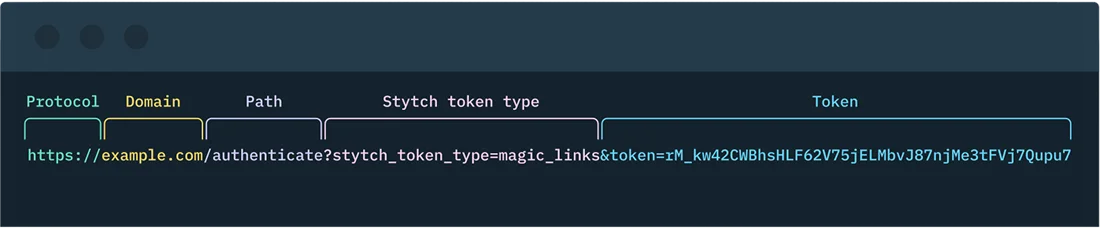
In addition, if you are familiar with email marketing, you may have heard of the term "domain warming" in the context of email deliverability. In the phishing simulation world, domain warming is a technique used to build a domain's reputation over time by gradually increasing the volume of legitimate traffic to it.
This helps to establish the domain as a trusted source in the eyes of email providers and spam filters. One common technique is to buy an expired domain with a clean reputation, or buy a fresh new domain months in advance of a phishing simulation campaign to avoid potential flags.
Submit the request and wait for Google’s review process (which typically takes 24-72 hours). Ensure the flagged domain is not in use during the review process, this usually speeds up the review process to less than 24 hours.
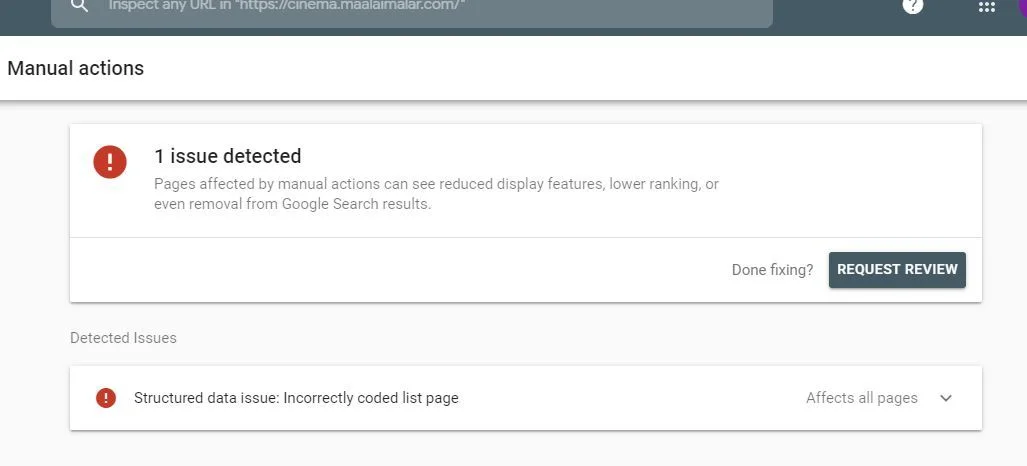
Also, ensure your domain is not flagged by any other security vendors like BitDefender, Kaspersky, Trend Micro, etc. If flagged, you need to request a review from them as well.
A good practice is to check the domain reputation on VirusTotal before starting the phishing campaign. If flagged, you can request a review from the respective security vendors or better, implement a script to automatically request a review from security vendors that have marked your domain as malicious.
Learn how to stay invisible to Google's bots →
Automatic Recovery
If a phishing simulation domain gets flagged, you can request a manual review from Google to remove the warning and restore accessibility.

Access Google Search Console and verify ownership of the flagged domain, then navigate to Security & Manual Actions → Security Issues to review the reason for flagging. Click "Request a Review", providing an explanation of the domain's purpose (e.g., internal security testing).
Here is a template you can use to request a review from Google:
Hello Google Search Console Team,
I am writing to request a review of the domain {DOMAIN} that was flagged for phishing. This domain is used for internal security testing purposes only and does not host any malicious content. We have taken the necessary steps to ensure that the domain complies with Google's policies and guidelines.
Thank you for your attention to this matter.
{YOUR NAME}
{YOUR COMPANY}
FAQ
-
Google Safe Browsing uses a mix of crowdsourced user reports, behavioral analysis, and dynamic risk assessment. Even domains used for authorized internal security testing can be flagged because they intentionally mimic phishing pages — the very signals Google is designed to detect.
-
Submitting a manual review request through Google Search Console is the most direct path. Once you've verified domain ownership and navigated to Security Issues, you can request a review with an explanation of the domain's testing purpose. Google typically processes these within 24–72 hours, and keeping the domain offline during review can speed up the process.
-
A combination of domain warming, URL structure morphing, and proactive monitoring via the Google Web Risk API reduces the risk significantly. Buying domains months in advance, using expired domains with clean reputations, and rotating URL paths all help avoid the pattern recognition that triggers automated flags.
-
Yes. Security vendors like Bitdefender, Kaspersky, and Trend Micro maintain their own threat databases independently of Google. A domain cleared by Google may still be blocked by other tools. Checking reputation on VirusTotal before launching a campaign — and submitting review requests to any flagging vendors — is essential for full operational continuity.
Learn how to navigate Google Safe Browsing for internal phishing simulations with Arsen’s dedicated white paper.
What you'll learn in this whitepaper:
- How Google Safe Browsing works
- How to Stay Invisible to Google's Bots
- How to Recover from a Domain Flagging
Learn how to navigate Google Safe Browsing for internal phishing simulations with Arsen's latest white paper.
About Arsen
Arsen is an advanced phishing simulation and human risk management platform that helps organizations train employees under real-world attack conditions. Designed by security experts, Arsen enables enterprises to safely simulate phishing, smishing, and AI-driven vishing campaigns across hundreds of thousands of employees worldwide, and to deliver adaptive Security Awareness Training (SAT) that strengthens human resilience against evolving threats.