ClickFix is a social engineering technique that tricks users into running malicious codes on their own computers. ClickFix attacks do not require an exploit or a software vulnerability. All it takes is a fictitious Captcha asking you to prove ‘you’re not a robot’ and a few keystrokes. That's what makes it so effective and so dangerous.
First detected in April 2024, ClickFix has grown fast. According to ESET data, attacks using this method surged by 517% in 2025 alone. It's no longer a niche tactic used in targeted campaigns, it's a widespread threat hitting firms gloabally.
How a ClickFix Attack Works
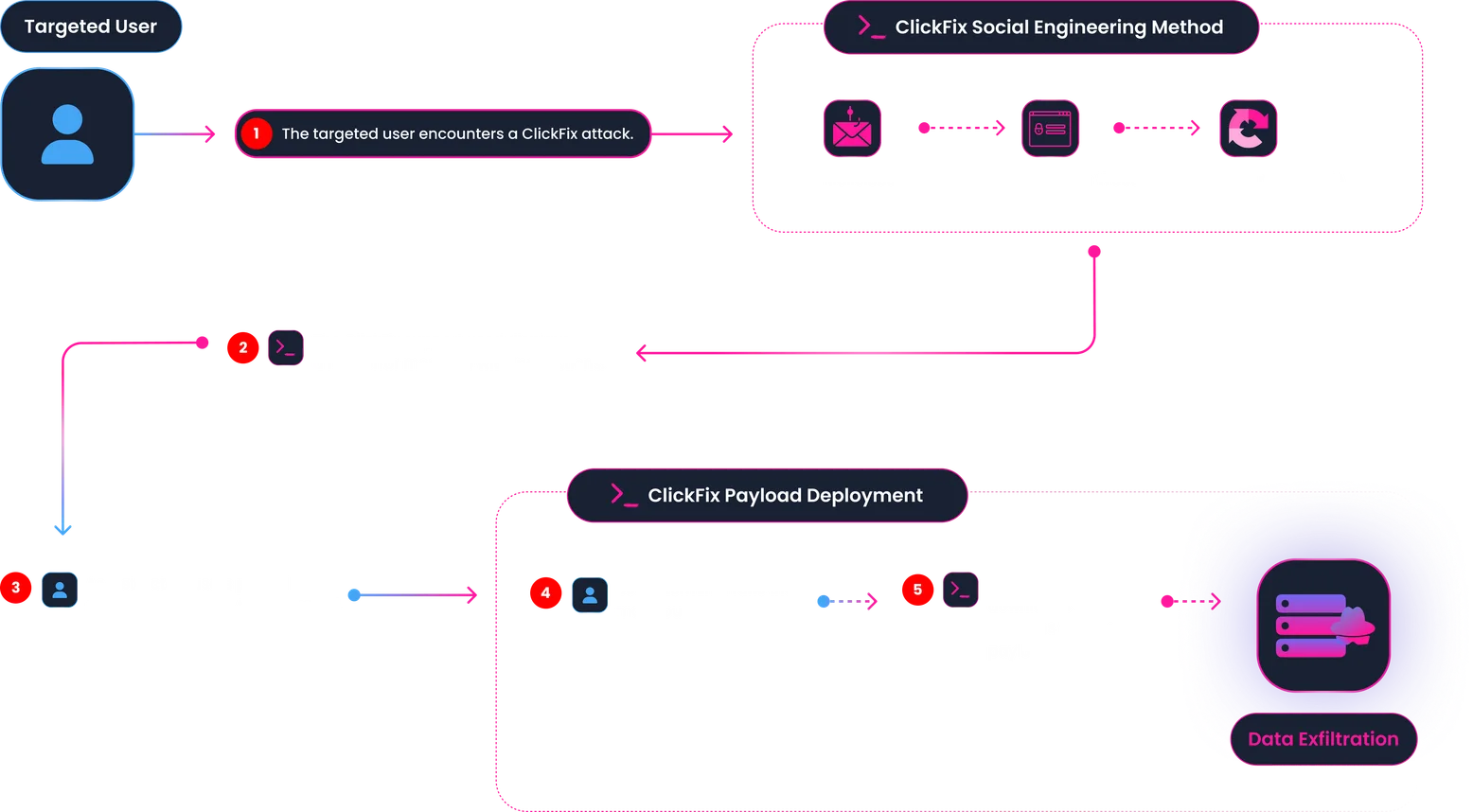
The attack is built entirely on deception. Here's the typical sequence:
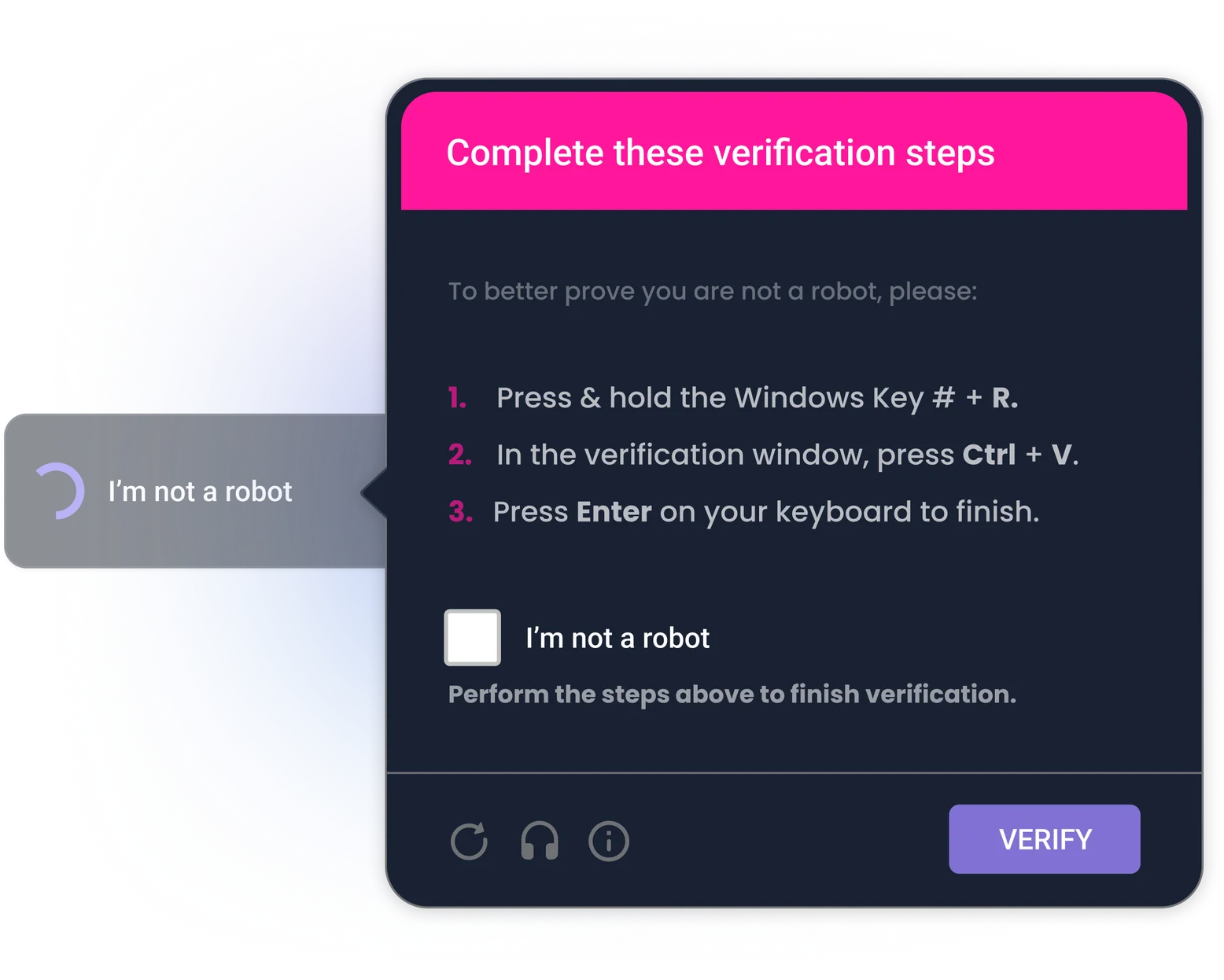
The lure. The victim lands on a compromised or fake website, or receives a phishing email, and encounters a pop-up simulating a Captcha protection. It might look like a legitimate security check, or a CAPTCHA verification. The message is designed to feel urgent and legitimate.
The "fix" button. The pop-up includes a button, often labeled Fix, How to fix, or Verify you're not a robot, that, when clicked, silently copies a malicious script to the user's clipboard.
The three keystrokes. The user can then be guided to:
- Press Win + R to open the Windows Run dialog
- Press Ctrl + V to paste the (invisible) script
- Press Enter to execute it
That's it. The user has just run malware on their own machine, with their own privileges, without any warning from the operating system. The name "ClickFix" comes from that "fix" call to action, though not every variant uses one. Some campaigns skip it entirely and frame the interaction as a bot check or a security verification.
What Happens After the Click?
Once the script runs, a malicious payload is downloaded and installed. The specific malware varies by campaign, but ClickFix has been linked to some well-known families: Lumma Stealer, AsyncRAT, XWorm, VenomRAT, DanaBot, and NetSupport RAT, among others.
Depending on the payload, attackers can:
- Steal credentials: passwords, session tokens, banking information
- Log keystrokes: capturing everything the user types
- Deploy ransomware: encrypting files and demanding payment
- Establish persistent access: installing backdoors for long-term control
- Move laterally: spreading to other devices on the same network
Because the user initiates the command themselves, many traditional security tools don't flag it. The execution looks like a normal user action.
Why ClickFix Is So Hard to Stop
Unlike phishing attacks that rely on a user clicking a malicious link or opening a malicious attachment, ClickFix weaponizes the user's own trust and helpfulness. The victim isn't "tricked into downloading malware"; they run it themselves, following what appear to be reasonable troubleshooting steps, they are used to do already.
This also means it bypasses a lot of automated defenses. There's no email attachment to scan, no suspicious download to flag. The malicious command arrives via the clipboard and is executed by the user, not by any automated process.
ClickFix can also be used in different delivery situations. For example, a "standard" phishing email will lead victims to a fake landing page with the ClickFix prompt. It could be a fake Google Meet link, a fake Calendar invite, a drive link, or even messages on social media. That flexibility makes it easy to change.
How to Protect Against ClickFix Attacks
ClickFix is fundamentally a human problem, which means the primary defense is human awareness. Technical controls help, but they're not enough on their own.
For organizations:
- Train employees on social engineering tactics, including ClickFix scenarios. This is the single most effective defense.
- Restrict the Windows Run dialog via Group Policy Objects (GPOs) to limit exposure.
- Block or monitor clipboard-based command execution through Windows Event logging.
- Restrict execution of mshta.exe and PowerShell from user directories.
- Deploy endpoint detection and response (EDR) solutions capable of catching post-execution behavior. Properly configured EDRs also help stop the most common ClickFix attacks.
- mplement MFA so that even stolen credentials can't immediately be used.
- Keep browsers and operating systems up to date.
For individuals:
- Be suspicious of any webpage or pop-up asking you to press keyboard shortcuts.
- Never paste content into a
Run dialogor terminal if a website told you to. - Treat any "fix" prompt involving
Win + Ras a red flag.
No single control eliminates the risk.
ClickFix succeeds because it chains together several small, individually reasonable-looking steps. Defense requires the same layered approach. With Arsen, you can trainon social engineering tactics, including ClickFix scenarios. This is the single most effective defense
Learn more about our ClickFix attack simulations scenarios →