Google Safe Browsing (GSB) is a widely adopted security feature that protects billions of users from malicious websites and phishing threats. While essential for preventing real cyberattacks, it presents unique challenges for organizations conducting internal phishing simulations. Arsen presents a 3-part series on navigating Google Safe Browsing to maintain effective phishing simulations. Download our dedicated white paper to learn more.
Overview
Google Safe Browsing covers over a billions Chrome users with Enhanced Protection and protects over 5 billions devices. As Safe Browsing evolves, especially with the introduction of Enhanced Safe Browsing, organizations must adapt their simulation strategies. This series explores how GSB works, its impact on phishing awareness programs, and proven methods for designing effective simulations that avoid unnecessary detection.
Disclaimer: The information in this series is designed for trained cybersecurity professionals conducting authorized phishing awareness and testing programs. Unauthorized or malicious use of these techniques could lead to legal consequences and ethical violations. Engaging in such activity may compromise systems or sensitive data. We strongly recommend using this content responsibly and within legal boundaries.
Why Consider Google Safe Browsing in Phishing Simulations
- Instant blocking: Safe Browsing can block test URLs across browsers, disrupting simulations.
- Skewed data: Blocked pages distort engagement metrics and training results
- Campaign delays: Flagged domains cause downtime and costly recovery steps
- Compliance needs: Simulations must balance realism with ethical and legal standards
Operational Challenges from Google Safe Browsing
Realism in Simulations
Phishing simulations aim to train employees using real-world attack conditions. However, Google Safe Browsing may block access to test pages, leading to incomplete or misleading security assessments.
Multi-Factor Authentication
Implementing MFA adds an extra layer of security by requiring users to provide multiple forms of verification before accessing sensitive systems. This could include something they know (a password), something they have (a smartphone), or something they are (a fingerprint).
Realism in Simulations
Organizations must balance compliance with the flexibility to run realistic phishing tests. Understanding how Safe Browsing flags pages helps optimize training while keeping tests effective and compliant.
How Google Safe Browsing Works?
Google Safe Browsing employs a multi-layered approach to analyze and categorize URLs, detecting potential threats in real time. The process involves a combination of automated detection, crowdsourced reports, and manual verification.
URL Indexing & Analysis
Automated Crawling & Threat Analysis
Google bots scan the web, looking for known attack patterns, malicious scripts, and suspicious behaviors.
Pattern-based Detection: Uses predefined patterns of known phishing attacks (e.g., login forms mimicking popular websites).
Heuristic Analysis: Detects unusual or suspicious behaviors, such as rapid domain redirects, hidden form submissions, or unusual JavaScript execution.
Machine Learning Models: Google employs AI-driven detection to spot zero-day phishing pages and evolving attack techniques.
Blacklisted Resources: If a website loads scripts, images, or assets from a known malicious domain, it may be flagged as unsafe.
User Reports & Crowdsourced Intelligence
Safe Browsing also relies on user reports and third-party security databases to enhance its detection capabilities.
Google's Report Phishing Tool: Allows users to flag suspicious URLs for review.
Browser Feedback Mechanisms: Chrome, Firefox and Safari all automatically report potentially harmful pages back to Google.
Threat Intelligence Feeds: Safe Browsing cross-references flagged sites with data from security firms, researchers, and abuse reports.
Key Takeway
Even if a phishing simulation page isn’t automatically flagged, it may still be reported by users or security vendors, triggering a manual review.
Reputation & Domain Age Considerations
Google also evaluates the history and trustworthiness of domains and subdomains.
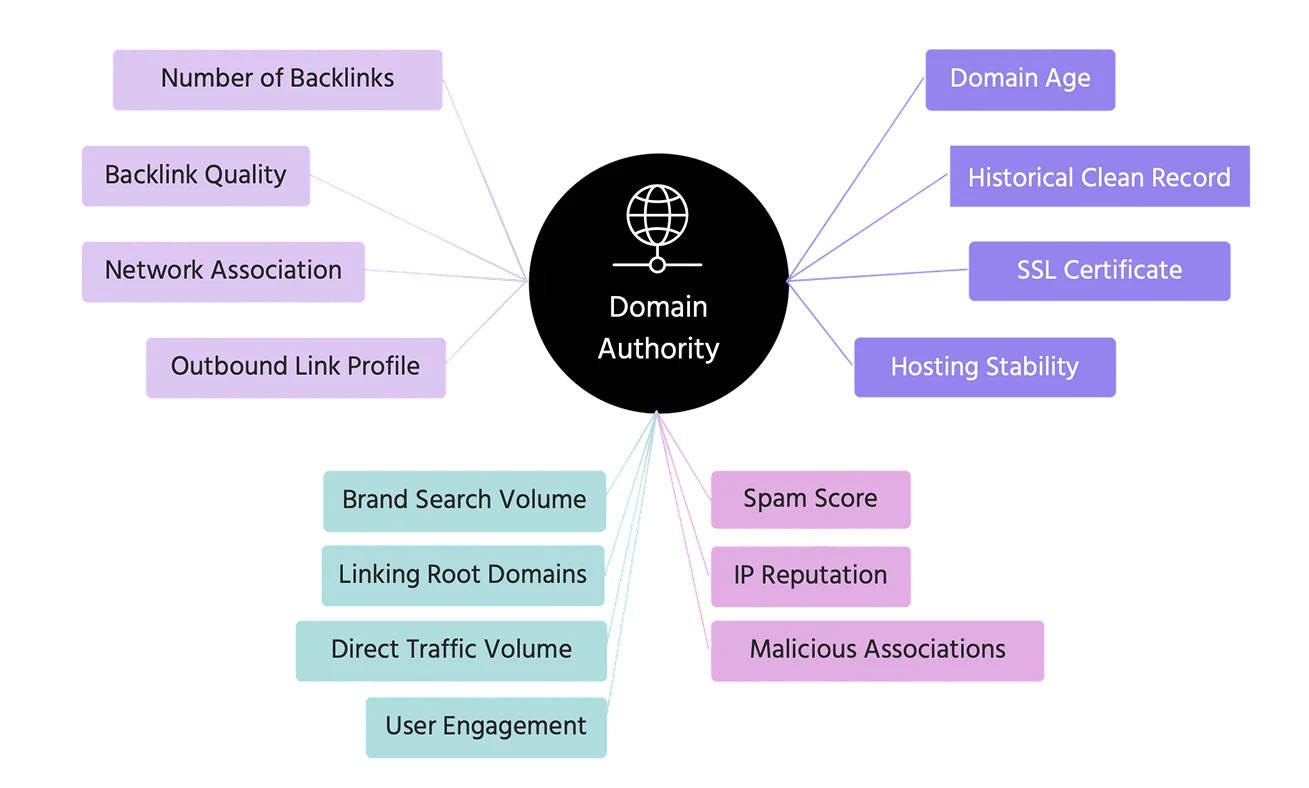
Factors that increase risk of flagging are, among others, newly registered domains, domain popularity, HTTPS & SSL Validity. To reduce the likelihood of premature flagging, organizations conducting phishing simulations should:
- Use longer-established domains or trusted subdomains for simulations
- Register and warm up phishing test domains before launching campaigns
- Ensure phishing simulation sites use valid SSL certificates
Reputation & Domain Age Considerations
Most major browsers (Chrome, Firefox, Safari...) leverage the Google Safe Browsing API to check websites against known malicious domains.
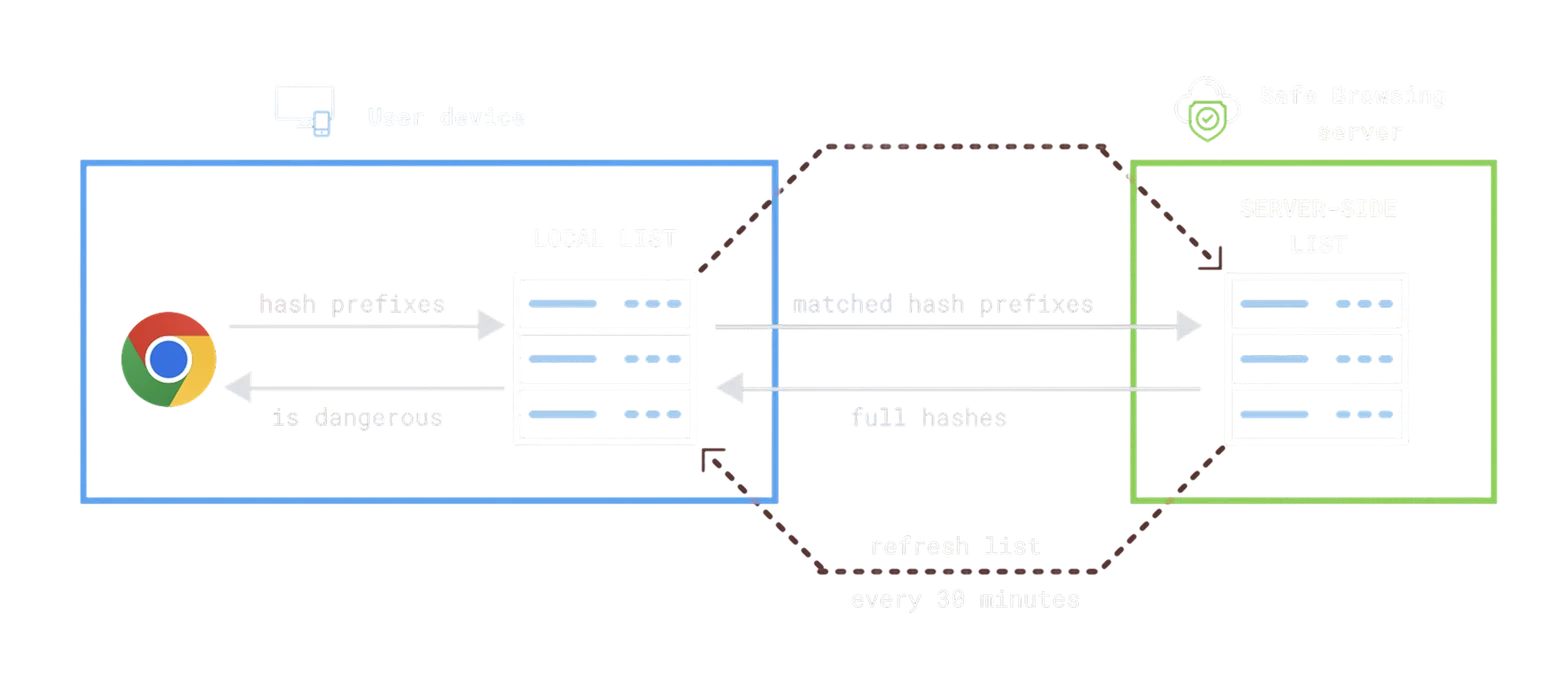
Lookup Mechanism When a user navigates to a URL, the browser compares it against a locally cached list of known unsafe sites. If the URL isn't found locally, the browser may query Google's servers for a more in-depth check.
Hash Prefix Matching To protect user privacy, browsers often send a hash prefix of the URL rather than the full URL. Google then returns a list of potential full hashes to compare locally.
Enhanced Protection Mode In Chrome’s Enhanced Protection mode, URLs are checked in real time against Google’s full Safe Browsing database. This significantly improves threat detection but sends more data to Google for verification.
Blocking and Removal Process
Once a domain is flagged, Safe Browsing updates its database, and access is restricted across all major browsers. Website owners can request a review via Google Search Console, but removal can take days, significantly disrupting legitimate phishing tests.
How Google's New Security Model Change the Game?
Google's Enhanced Safe Browsing (ESB) marks a major evolution in web security by moving beyond static threat lists to real-time, behavior-based detection. Unlike traditional Safe Browsing, ESB continuously analyzes URLs, scores risk dynamically, and monitors user behavior to identify threats such as phishing, crawlers, and automated scripts.
It correlates multiple signals, such as domain history, TLS fingerprinting, and behavioral anomalies, to flag threats more quickly and accurately. ESB also shares threat intelligence across Google services including Gmail, Chrome, and Workspace, enabling immediate cross- platform blocking once a domain is flagged.
This shift significantly reduces the effectiveness of traditional evasion techniques, compelling phishing simulation providers to adopt more dynamic, adaptive, and obfuscated strategies to remain effective.
Learn how to navigate Google Safe Browsing for internal phishing simulations with Arsen’s dedicated white paper.
What you'll learn in this whitepaper:
- How Google Safe Browsing works
- How to Stay Invisible to Google's Bots
- How to Recover from a Domain Flagging
Learn how to navigate Google Safe Browsing for internal phishing simulations with Arsen's latest white paper.
About Arsen
Arsen is an advanced phishing simulation and human risk management platform that helps organizations train employees under real-world attack conditions. Designed by security experts, Arsen enables enterprises to safely simulate phishing, smishing, and AI-driven vishing campaigns across hundreds of thousands of employees worldwide, and to deliver adaptive Security Awareness Training (SAT) that strengthens human resilience against evolving threats.