Arsen MCP connects your AI assistant to your Arsen data. Ask in plain language about your phishing simulation campaigns, awareness training and training programs, and get answers, summaries and reports built from your own results, with read-only access.
What is Arsen MCP?
Arsen MCP is a Model Context Protocol (MCP) server hosted by Arsen. MCP is an open standard that lets an AI assistant use tools from other software. With Arsen MCP, your assistant queries your Arsen data, within the organizations you can access in Arsen, and each request is checked against your current Arsen permissions.
What can you read from Arsen MCP?
Your assistant retrieves and analyzes the data your team already has in Arsen:
- Phishing simulation campaigns: campaign results, click, compromise and report rates, phishing score trends and coverage of active employees.
- Awareness training and training programs: training assignment, completion and results by group.
- Priorities: the groups with the lowest scores, to decide where to focus next.
Answers stay at organization and group level, without employee names or email addresses. Groups below five employees are not shown.
Which AI assistants can you connect?
Any assistant that supports remote MCP servers with sign-in can connect. The connection method depends on the assistant:
 Claude · One-click connection from your Arsen account settings
 ChatGPT · Custom connector with the Arsen server URL
 Gemini · Custom connector with the Arsen server URL
 Microsoft Copilot · Custom connector with the Arsen server URL
 Grok · Custom connector with the Arsen server URL
 Perplexity · Custom connector with the Arsen server URLClaude Code · Setup prompt copied from your Arsen account settings
 Cursor · Setup prompt copied from your Arsen account settings
Whichever method you use, you sign in to Arsen in your browser with your usual account, SSO and MFA included. There is no token to copy or store.
How do you connect Arsen MCP?
Arsen MCP is activated from the MCP section of your Arsen account settings.
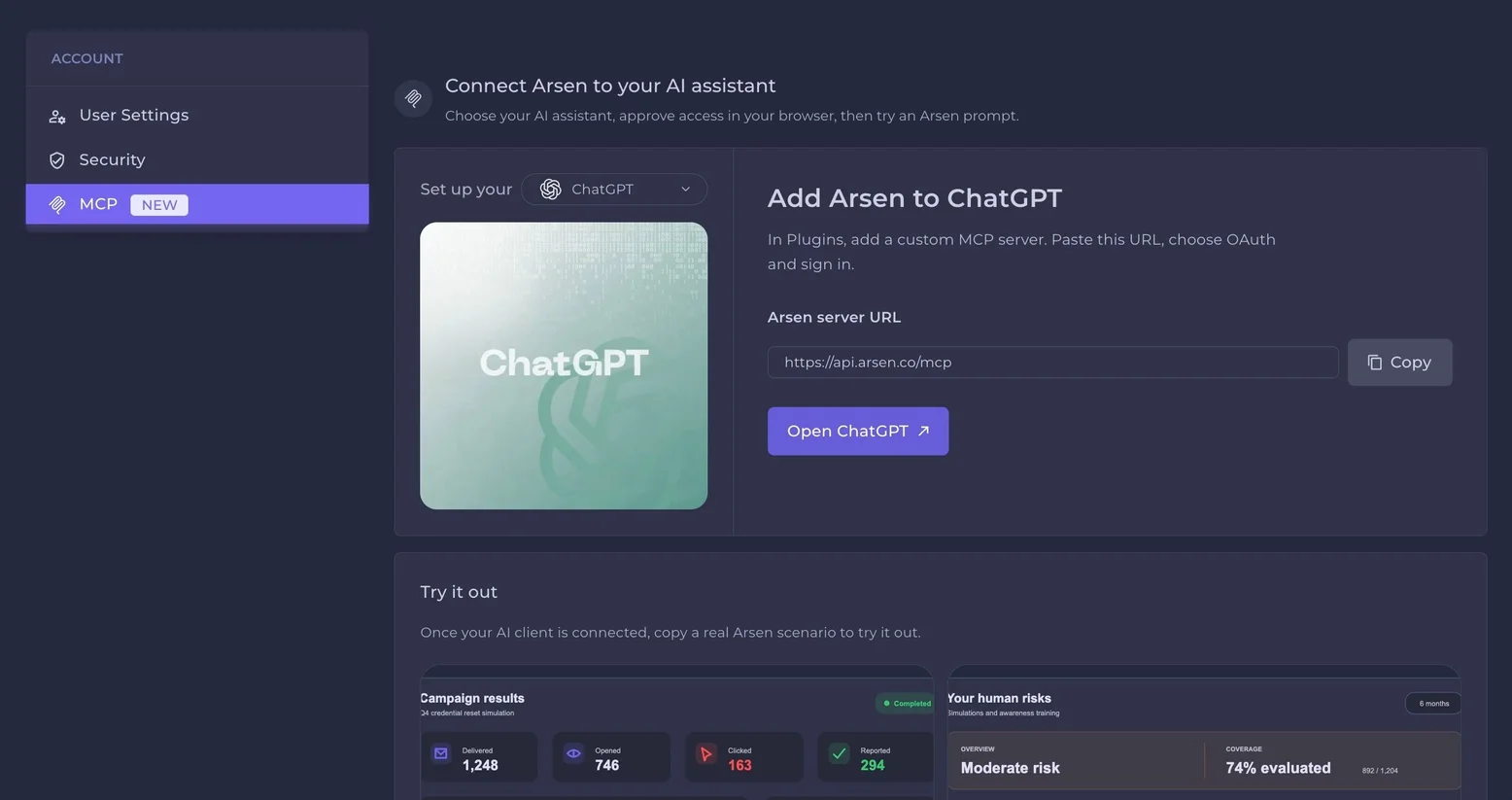
https://api.arsen.co/mcp, or copy the setup prompt for coding agents.See the full setup guide for each assistant →
Requirements
- An Arsen account with access to at least one organization. Your assistant sees the same organizations and data you see in Arsen.
- An AI assistant that supports remote MCP servers with sign-in. In ChatGPT, custom connectors are available in developer mode on paid plans.
- On team and enterprise assistant plans, your workspace admin may need to allow custom connectors.
Which prompts should you try first?
These recommended prompts are read prompts. They work with Arsen MCP V1 as it is and can be used right away. Replace the words in brackets with your organization and period, then open them in ChatGPT or Claude, or copy them.
ISO 27001 audit evidence
Compliance and audit readiness
Using Arsen, build an ISO 27001 audit evidence report for [ORG] over [PERIOD]. Cover security awareness training and phishing simulations, highlighting trends, coverage, and gaps. Deliver a visual PDF with charts first and detailed tables in the appendix.
Organization weakness
Identify the weakest links in your organization
Using Arsen, assess [ORG]'s human security weaknesses over [PERIOD]. Identify vulnerable teams, recurring risky behaviors, and gaps in security awareness. Rank findings by risk and recommend prioritized actions. Deliver a visual PDF report.
Threat intelligence and emerging risks
Compare your posture against the latest research
Using Arsen, compare [ORG]'s security awareness and phishing resilience against recent threat intelligence, public research, and emerging attack techniques. Identify relevant exposure gaps, cite sources, and recommend mitigations. Deliver a visual PDF report.
Executive security posture
What leadership actually needs to know
Using Arsen, produce an executive security posture report for [ORG] over [PERIOD]. Summarize human risk, phishing resilience, training effectiveness, and critical weaknesses. Highlight trends, business impact, and the top 5 actions leadership should prioritize. Deliver a visual PDF.
Security program effectiveness
Are your security initiatives actually working?
Using Arsen, evaluate the effectiveness of [ORG]'s security awareness program over [PERIOD]. Correlate training participation with phishing simulation outcomes, identify improvements and regressions, and recommend changes based on measurable results. Deliver a visual PDF report.
-
Arsen MCP is a Model Context Protocol server that connects your AI assistant to Arsen. It lets the assistant query your phishing simulation campaigns, awareness training and training programs, and answer in plain language.
-
No. Arsen MCP V1 is read-only: it cannot create, change, launch or delete anything in Arsen. Write capabilities, to deploy campaigns and trigger actions from your assistant, will become available to all customers in the coming weeks.
-
No. Answers stay at organization and group level, without employee names or email addresses, and groups below five employees are not shown.
-
An Arsen account and an AI assistant that supports remote MCP servers with sign-in. Open the MCP section of your Arsen account settings, connect your assistant, then sign in with your usual Arsen account, SSO and MFA included.