To simulate AI voice impersonation of your IT help desk, an authorized AI caller phones employees as IT support and asks for what real attackers ask for: a one-time code, a remote session or a password reset. Run it in phases, test against a verification rule employees already know, and follow every failed call with targeted training.
Key takeaways
- Voice phishing was the second most common initial infection vector in 2025, at 11% of intrusions, according to Mandiant.
- Publish the verification rule first, then test it. A simulation measures a behavior employees were taught, not a guess.
- Start with calls from "IT" to employees, then chain a follow-up email, then use a familiar voice, then test the service desk itself.
- Every phase pairs a test with a lesson and ends on an exit criterion.
- Track compromised, resisted and reported outcomes by team rather than a single pass rate.
What does an IT help desk vishing simulation test?
An IT help desk vishing simulation is an authorized phone call in which an AI caller poses as internal IT support and tries to get an employee to break a security rule. It tests one decision: does the employee verify the caller through a known channel before reading a code, granting remote access or resetting anything?
The simulation can also run in the other direction. A caller poses as a locked-out employee and asks a service desk agent for a password or MFA reset. Both directions appear in real intrusions, and this plan covers both.
Why does the help desk pretext work so well?
Employees are trained to cooperate with IT, and IT legitimately calls about updates, resets and access. An attacker who sounds like support borrows that trust, and the request arrives by phone, where no email filter inspects it.
The numbers reflect it. In its M-Trends 2026 report, Mandiant found that voice phishing reached 11% of intrusions in 2025, the second most common initial infection vector, while email phishing fell to 6%. The same report tracks how UNC3944, the group also known as Scattered Spider, targets IT help desks to bypass MFA.
The pattern repeats across recent campaigns:
- Fake help desk on Microsoft Teams. In an April 2026 analysis of cross-tenant help desk impersonation, Microsoft describes attackers in an external tenant posing as IT, persuading users to open Quick Assist, and reaching domain controllers soon after. Microsoft's September 2026 follow-up on IT support impersonation documents the same opening with "Microsoft Security Update" and "Account Verification" lures. Our breakdown of fake IT help desk calls on Microsoft Teams follows that chain call by call.
- Calls that defeat MFA. A November 2026 advisory from Accorian, citing a Canadian Centre for Cyber Security alert, describes fake IT calls and Teams messages that sent law firm employees to branded login pages relaying credentials and MFA responses in real time. The new vishing kits that sync a phishing page with the caller's script make that pairing easy to run.
- Calls to the service desk itself. The CISA and FBI advisory on Scattered Spider states that the group posed as IT staff to obtain employee credentials and convinced help desk personnel to reset passwords and MFA tokens.
Why agents and employees comply, and the controls that stop it, are covered in our guide to AI voice phishing against IT help desks. This article stays on running the simulation.
Which pretexts should the simulation use?
Use the pretexts attackers use against organizations like yours, phrased the way your own IT team speaks. Each pretext maps to one request, so each call tests one rule.
| Pretext | What the caller asks for | Seen in |
|---|---|---|
| Security or spam filter update | Join a call, open Quick Assist, read back the connection code | Microsoft Teams campaigns, 2026 |
| Account verification | Confirm an employee number, username or manager's name | Microsoft Teams campaigns, 2026 |
| MFA change or re-enrollment | Approve a prompt or read a one-time code | Law firm campaign, 2026 |
| Urgent password reset | Log in through a link IT "just sent" | Law firm campaign, 2026 |
| Locked-out employee (reverse direction) | Reset a password or an MFA method | Scattered Spider |
What do you need before the first call?
You need four things in place: written authorization, a verification rule employees know, a reporting channel, and a test identity for service desk scenarios. Without them, a failed call measures confusion about the rules rather than a risky behavior.
- Signed authorization from the CISO and the business owner, with scope, dates and exclusions.
- Legal, HR and, where applicable, works council review of recording, consent and data retention.
- A published rule: IT never asks for codes or passwords and never starts a remote session you did not request, and any "IT" request is verified by calling back the service desk on its known number.
- A reporting channel for suspicious calls, and someone who answers it during the campaign.
- For service desk scenarios, a dedicated test account the caller asks about, so no real account is ever reset.
What is the step-by-step plan?
Run six phases over about ten weeks, then repeat on a quarterly cadence. Each phase starts only when the previous one has met its expected outcome.
Week 0: Authorize and scope the program
Objective: make the simulation defensible before anyone is called.
Key actions: define target groups and exclusions (employees on leave, people in sensitive situations), decide how recordings are stored and for how long, agree on a no-blame debrief, and write the message employees receive after the campaign.
People involved: CISO, legal or DPO, HR, works council where applicable, service desk manager.
Simulation to deploy: none yet.
Awareness training: none for employees. Brief the service desk manager so real escalations during the campaign are routed correctly.
Expected outcome: a signed scope document. The questions to settle are listed in our guide to the legal considerations of AI voice phishing simulations.
Week 1: Publish the rule you will test
Objective: give every employee one clear verification rule.
Key actions: publish what IT will and will not ask for, the callback number, and how to report a suspicious call. Microsoft also recommends a verbal authentication phrase between users and the help desk and restricting Teams external access to trusted domains. Decide which of these you adopt.
People involved: IT, security, internal communications.
Simulation to deploy: none. Testing a rule nobody has heard of only confirms that it was never shared.
Awareness training: a short lesson on the fake IT call. Interactive awareness lessons let employees take a simulated vishing call inside the lesson instead of reading about one.
Expected outcome: the rule is published and the reporting channel is staffed.
Weeks 2 to 3: Run a baseline call from "IT"
Objective: measure how employees respond to a plausible IT request from an unknown voice.
Key actions: pick one or two pretexts from the table above and call a representative sample of each department. Spread the calls over time so colleagues do not warn each other.
People involved: security awareness owner, service desk manager (aware, to handle real callbacks).
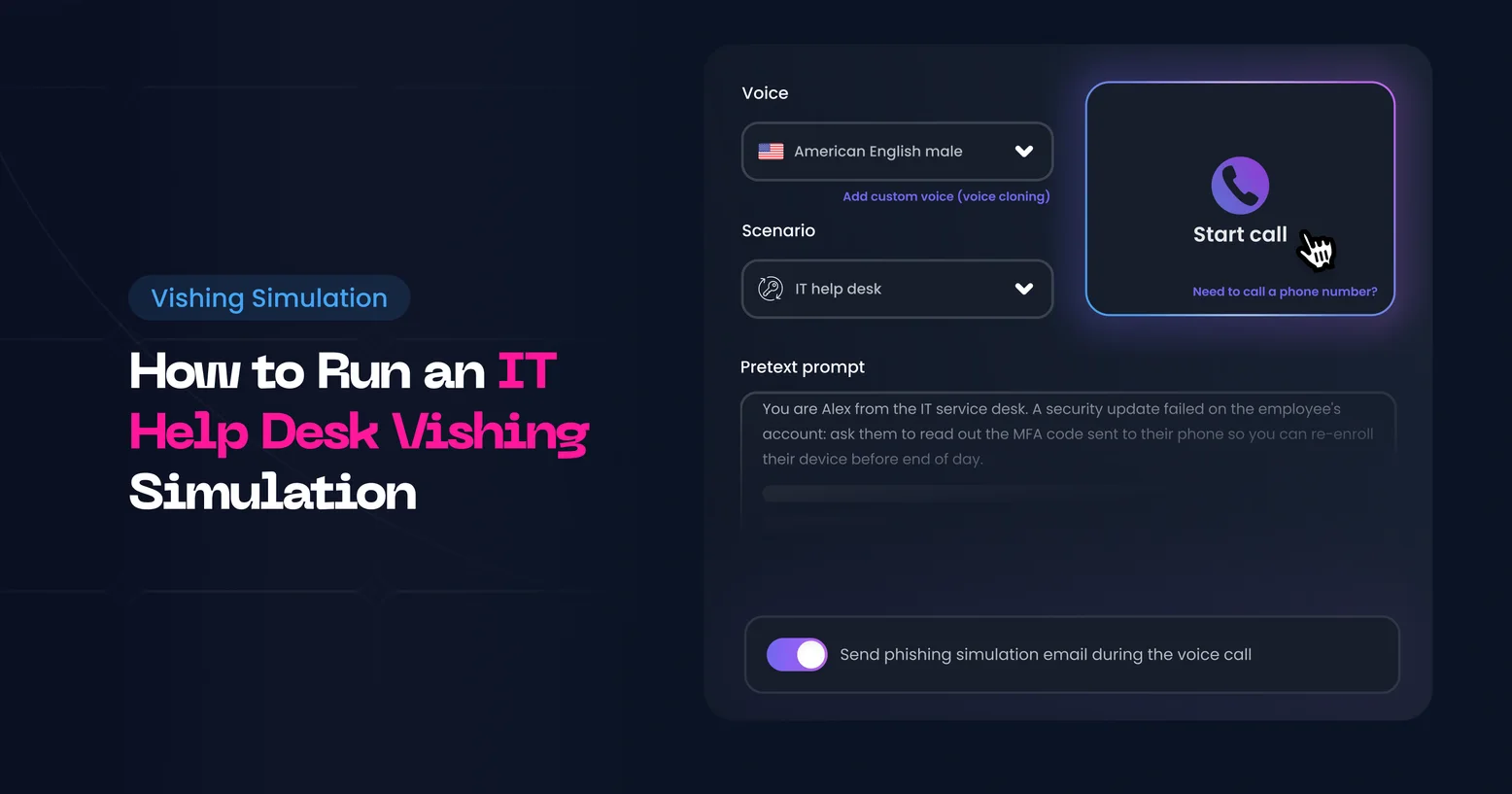
Simulation to deploy: a goal-driven elicitation call. In Arsen vishing simulation, you describe what the caller should obtain, for example an employee number or a one-time code, and Arsen writes the caller's brief and adapts the call to each answer. Each call returns a graded outcome: compromised (full or partial), resisted (deflected, probed or blocked) or no result.
Awareness training: employees who complied get a short lesson on the fake IT call right after the campaign. Those who blocked the caller get a note confirming they did the right thing.
Expected outcome: a baseline of compromised and resisted outcomes per department, and the list of teams that need the next phase first.
Weeks 4 to 5: Chain the call with an email
Objective: test the pattern of the 2026 law firm campaign, where the call sets up a login page.
Key actions: the caller announces an email from IT, the email arrives as soon as the call ends, and the link opens a login page. Use the same pretext as the baseline for the teams that resisted it, a new one for the others.
People involved: security awareness owner, email security team (to allow the simulation domains).
Simulation to deploy: a phone-to-phish scenario. Arsen drafts the follow-up email from the IT team, you pick the landing page from the gallery, and the result comes from what the employee does after hanging up.
Awareness training: a lesson on how attackers use a call to make a later email look expected.
Expected outcome: you know whether employees who resist a call still click when the call primes the email.
Weeks 6 to 7: Use a voice employees recognize
Objective: test whether verification holds when the voice on the line is familiar.
Key actions: ask the IT or service desk lead to lend their voice, and target only the teams that know it. Sent to people who never heard that voice, the call tests a stranger's request again.
People involved: the IT lead whose voice is cloned, legal or DPO, security awareness owner.
Simulation to deploy: an elicitation or phone-to-phish call in a cloned voice. The person records 10 to 60 seconds live in Arsen and ticks a consent statement, and the raw recording is discarded once the clone is created, as our voice cloning release note details.
Awareness training: a lesson stating plainly that a familiar voice is not proof of identity, with the callback rule repeated.
Expected outcome: the gap between results with an unknown voice and a known one, per team.
Weeks 8 to 10: Test the service desk itself
Objective: check that agents apply the identity verification procedure under pressure.
Key actions: a caller posing as a stressed employee, traveling or locked out before a deadline, asks agents for a password or MFA reset on the test account. Score the agent's decision, not the account change.
People involved: service desk manager, identity and access team, agents (informed that tests happen, not when).
Simulation to deploy: an elicitation call targeting service desk agents, with the reset of the test account as the caller's goal and escalation levers such as urgency and seniority.
Awareness training: a team debrief with the call recordings, followed by a drill on the verification steps: callback to the number on file, approval through an enrolled authenticator, manager sign-off for high-risk changes.
Expected outcome: a verified reset procedure, or a list of the steps agents skip and why.
Every quarter: Repeat and rotate
Run the cycle again each quarter for high-risk teams: service desk, finance, executive assistants and administrators. Rotate pretexts, keep the ones that still produce compromised outcomes, and retire the ones every team now blocks.
How do you run it safely?
Keep the simulation inside the authorization and make it impossible for a call to cause real damage. A safe simulation never collects real passwords, never resets a real account and never singles out an employee publicly.
- Use test targets for anything destructive. Reset requests point at a test account, and landing pages record the action without storing real credentials.
- Exclude people in sensitive situations as agreed with HR, and respect calling hours in each country.
- Keep recordings on a need-to-know basis and delete them on the agreed schedule.
- Debrief without blame. Share results by team, coach individuals privately, and recognize employees who blocked or reported the call.
Which metrics show progress?
Track outcomes by team and by pretext, and watch the trend across quarters. A single pass rate hides the difference between an employee who refused politely and one who verified and reported.
| Metric | What it tells you | Direction to aim for |
|---|---|---|
| Compromised, full or partial | Who gave the caller what was asked | Down each quarter |
| Resisted, blocked | Who refused and ended the exchange | Up each quarter |
| Reported | Who used the reporting channel | Up each quarter |
| Follow-up email activity | Who acted on the email the call announced | Down each quarter |
| Familiar voice gap | Extra compliance with a known voice | Closing |
| Service desk verification | Agents who completed every verification step | Up to all agents |
What mistakes should you avoid?
- Testing before teaching. Publish the rule first, or the results only show that it was never shared.
- Calling everyone the same day. Word spreads in minutes and the results measure the rumor.
- Using one pretext for a year. Employees learn the script, not the habit.
- Ignoring the reverse direction. The service desk reset procedure is the control attackers aim at.
- Publishing names. Shame lowers reporting, and reporting is the behavior you need most.
-
An authorized AI caller phones employees as IT support and asks for what attackers ask for, such as a one-time code, a remote session or a password reset. Run it after publishing a verification rule, score each call, and follow failures with a short lesson.
-
Vishing simulations are generally run with written management authorization, but call recording, consent and data protection rules vary by country and state. Review them with legal, HR and, where applicable, the works council before the first call.
-
The service desk manager should know, so real callbacks from employees are handled correctly. Agents can be told that tests happen without being told when, which keeps their own verification test meaningful.
-
Yes, with that person's consent. A cloned voice tests whether employees still verify when the voice is familiar. Use it only with teams that know the voice, and agree in advance how the recording and the clone are stored and deleted.
-
Run a full cycle at least quarterly for high-risk teams such as the service desk, finance and executive assistants, and rotate pretexts each time. Teams with repeated compromised outcomes can be called more often, paired with training.